
關注點
- 資料庫設計:設計適合的資料庫結構來支持 CRUD 操作,確保資料的完整性與一致性。
- CRUD 實作:在 Spring Framework 中實現 CRUD 操作,使用 JPA 來與資料庫進行互動。
- RESTFul API 設計:設計符合 RESTful 核心概念「資源」的 API。
CRUD & RESTFul API
這篇文章將介紹 CRUD(Create, Read, Update, Delete)操作在 Spring Framework 中的實作方式,並結合 RESTFul API。
實作以下功能:
- 文章創建:使用 POST 請求來創建新的文章,並將資料保存到資料庫中。
- 文章查詢:使用 GET 請求來查詢文章列表或特定文章的詳細資訊。
- 文章更新:使用 PUT 請求來更新現有文章的內容。
- 文章刪除:使用 DELETE 請求來刪除指定的文章。
- 文章標籤新增:實現多對多關聯,讓文章可以有多個標籤,並且可以查詢文章的標籤資訊。
ps. 權限管理、驗證與授權等功能將在後續章節中介紹,這裡先專注於 CRUD 操作的實作。
加入相關依賴
- jackson-datatype-jsr310:對日期與時間 API(如 LocalDate、LocalDateTime)的支援,確保這些類型能正確序列化與反序列化為 JSON。
- jackson-databind:核心的 JSON 處理庫,提供對 Java 物件與 JSON 之間的轉換功能。
- jakarta.validation-api:提供對 Java Bean 驗證的支援,確保資料的完整性與一致性。
    <dependency>
        <groupId>com.fasterxml.jackson.datatype</groupId>
        <artifactId>jackson-datatype-jsr310</artifactId>
        <version>2.21.1</version>
    </dependency>
    <dependency>
        <groupId>com.fasterxml.jackson.core</groupId>
        <artifactId>jackson-databind</artifactId>
        <version>2.21.1</version>
    </dependency>
    <dependency>
        <groupId>jakarta.validation</groupId>
        <artifactId>jakarta.validation-api</artifactId>
        <version>3.1.1</version>
    </dependency>
ERD 設計
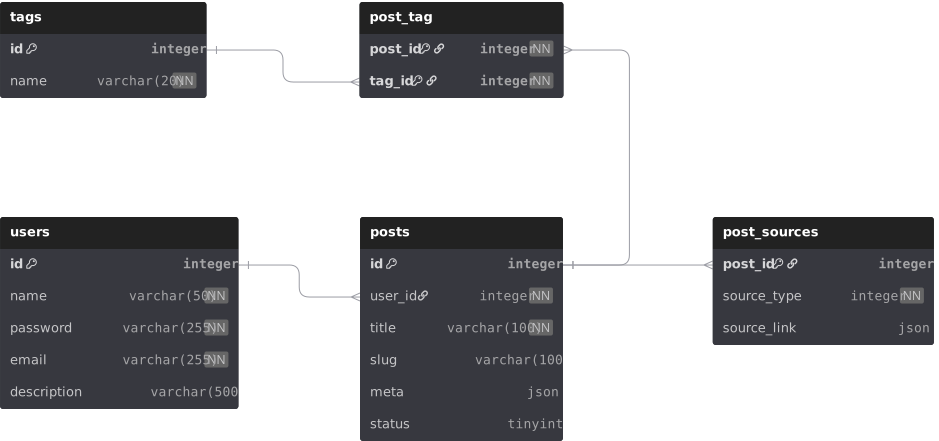
資料庫關聯說明
一對一關聯:用在附加、隔離資訊,給主表格使用,例如文章來源。
一對多關聯:使用者與文章的關聯,一個使用者可以有多篇文章。
多對多關聯:文章與標籤的關聯,一篇文章可以有多個標籤,一個標籤也可以對應多篇文章。
暫時不實作的關聯
越過過關聯(Through Association)系列:用在 A 與 B 之間沒有直接關聯,但都與 C 有關聯,透過 C 來間接連結 A 與 B。
ps. 雖說多對多也算是一種越過關聯,它是透過第三個表格來連結兩個表格的多對多關聯。
但這裡的越過關聯,指的是更複雜的情況,例如:文章與使用者之間沒有直接關聯,但都與文章來源有關聯,透過文章來源來連結文章與使用者。
設計開始
假定 spring sparrow 用來當作 blog 的後端,主要功能是管理文章、使用者。
簡單設計一下資料庫結構,以下是各表說明:
- users:使用者表,基本資訊,如名稱、密碼、電子郵件等,並與角色表建立關聯。
- posts:文章表,包含文章的標題、狀態、相關的使用者與系列等資訊。
- tags:標籤表,用來管理文章的標籤資訊。
- post_tag:文章與標籤的關聯表,用來表示多對多的關係。
- post_sources:文章來源表,用來管理文章的來源資訊,與 posts 表建立一對一的關聯。
使用 DBML 語法繪製 ERD 圖,定義資料庫的結構與關聯。
Table users {
  id integer [primary key]
  name varchar(50) [not null, unique]
  password varchar(255) [not null]
  email varchar(255) [not null, unique]
  description varchar(500)
}

Table posts {
  id integer [primary key]
  user_id integer [not null]
  title varchar(100) [not null]
  slug varchar(100) [unique]
  meta json
  status tinyint [default: 0]
}

Table post_sources {
  post_id integer [primary key]
  source_type integer [not null]
  source_link json
}

Table tags {
  id integer [primary key]
  name varchar(20) [not null, unique]
}

Table post_tag {
  id integer [primary key]
  post_id integer [not null]
  tag_id integer [not null]
}

Ref user_posts: posts.user_id > users.id
Ref post_source_post: post_sources.post_id > posts.id
Ref post_tag_post_key: post_tag.post_id > posts.id
Ref post_tag_tag_key: post_tag.tag_id > tags.id
調整專案結構
隨著功能的增加,調整一下專案結構。
記得改變 Config 掃描路徑、import 路徑等,確保 Spring 能正確載入相關元件。
專案「骨架」採用經典的「三層式架構垂直分層」(3-Tier Architecture),處理流程劃分如下:
Controller 層:負責接收 HTTP 請求、驗證輸入參數(DTO)、呼叫 Service 層。
Service 層:核心業務邏輯的所在。負責處理資料運算、呼叫 Repository 存取資料庫,並管理 Transaction(交易)。
Repository 層:負責與資料庫互動,透過 Spring Data JPA 提供的方法執行 SQL 操作。
ps. 檔案數量超過兩個再開資料夾,若只有一個檔案就放在模組根目錄下,設計理念,寫在文章最下方。
以下示意,以此類推:
sparrow
├─ src
│  ├─ main
│  │  ├─ asciidoc
│  │  │  └─ index.adoc
│  │  │
│  │  ├─ java
│  │  │  └─ sparrow
│  │  │     ├─ App.java
│  │  │     ├─ MessageService.java
│  │  │     │
│  │  │     ├─ aspect
│  │  │     │  └─ LoggingAspect.java
│  │  │     │
│  │  │     ├─ config
│  │  │     │  ├─ AppConfig.java
│  │  │     │  ├─ AppInitializer.java
│  │  │     │  ├─ JPAMySqlConfig.java
│  │  │     │  └─ WebConfig.java
│  │  │     │
│  │  │     ├─ exception
│  │  │     │  ├─ ConflictException.java
│  │  │     │  ├─ GlobalExceptionHandler.java
│  │  │     │  └─ ResourceNotFoundException.java
│  │  │     │
│  │  │     ├─ external
│  │  │     │
│  │  │     ├─ post
│  │  │     │  ├─ PostController.java
│  │  │     │  ├─ PostService.java
│  │  │     │  │
│  │  │     │  ├─ converter
│  │  │     │  │  ├─ PostStatusConverter.java
│  │  │     │  │  └─ SourceTypeConverter.java
│  │  │     │  │
│  │  │     │  ├─ dto
│  │  │     │  │  ├─ PostListResponse.java
│  │  │     │  │  ├─ PostRequest.java
│  │  │     │  │  ├─ PostResponse.java
│  │  │     │  │  ├─ PostSourceRequest.java
│  │  │     │  │  └─ PostSourceResponse.java
│  │  │     │  │
│  │  │     │  ├─ entity
│  │  │     │  │  ├─ Post.java
│  │  │     │  │  ├─ PostSource.java
│  │  │     │  │  ├─ PostTag.java
│  │  │     │  │  └─ Tag.java
│  │  │     │  │
│  │  │     │  ├─ mapper
│  │  │     │  │  ├─ PostMapper.java
│  │  │     │  │  └─ PostSourceMapper.java
│  │  │     │  │
│  │  │     │  ├─ repository
│  │  │     │  │  ├─ PostRepository.java
│  │  │     │  │  ├─ PostSourceRepository.java
│  │  │     │  │  ├─ PostTagRepository.java
│  │  │     │  │  └─ TagRepository.java
│  │  │     │  │
│  │  │     │  └─ vo
│  │  │     │     ├─ Meta.java
│  │  │     │     ├─ SourceLink.java
│  │  │     │     │
│  │  │     │     └─ enums
│  │  │     │        ├─ PostStatus.java
│  │  │     │        └─ SourceType.java
│  │  │     │
│  │  │     ├─ status
│  │  │     │  └─ StatusController.java
│  │  │     │
│  │  │     └─ user
│  │  │        ├─ User.java
│  │  │        └─ UserRepository.java
│  │  │
│  │  └─ resources
│  │     ├─ application.properties
│  │     ├─ application.properties.example
│  │     └─ logback.xml
文章 Post Entity 類別實作
@Entity
@Table(name = "posts")
public class Post {
    @Id
    @GeneratedValue(strategy = GenerationType.IDENTITY)
    private Integer id;

    @ManyToOne(fetch = FetchType.LAZY, optional = false)
    @JoinColumn(name = "user_id", nullable = false)
    private User user;

    @Column(nullable = false, length = 100)
    private String title;

    @Column(length = 100, unique = true)
    private String slug;

    @JdbcTypeCode(SqlTypes.JSON)
    @Column(columnDefinition = "json")
    private Meta meta;

    @Column(columnDefinition = "TINYINT", nullable = false)
    private PostStatus status = PostStatus.DRAFT;

    @OneToOne(mappedBy = "post", cascade = CascadeType.ALL, orphanRemoval = true, fetch = FetchType.LAZY)
    private PostSource postSource;

    @OneToMany(mappedBy = "post", cascade = CascadeType.ALL, orphanRemoval = true, fetch = FetchType.LAZY)
    private Set<PostTag> postTags = new HashSet<>();

    public Post() {
    }

    // getter 和 setter 方法,省略...

    public void clearTags() {
        this.postTags.clear();
    }

    public void addTag(Tag tag) {
        PostTag postTag = new PostTag();
        postTag.setPost(this);
        postTag.setTag(tag);
        this.postTags.add(postTag);
    }

    public Integer getUserId() {
        return this.user != null ? this.user.getId() : null;
    }

    public Set<String> getTagNames() {
        return this.postTags.stream()
                .map(pt -> pt.getTag().getName())
                .collect(Collectors.toSet());
    }

    public void updateSource(PostSource source) {
        if (source != null) {
            source.setPost(this);
            this.postSource = source;
        }
    }
}
實作 Create 文章 API
將 Service 注入到 Controller 中,實作 CRUD 邏輯。
Spring 標註說明:
@RestController:表示該類別下的所有端點直接返回資料(JSON),不渲染視圖。
@RequestBody:將 HTTP 請求的 JSON Body 反序列化為 Java 物件。
@Valid:觸發 Jakarta Bean Validation(如 @NotNull),驗證失敗則拋出例外。
@Transactional:確保資料庫操作在同一交易中執行,發生例外時自動 Rollback。
Create Post Controller
@RestController
@RequestMapping("/api/posts")
public class PostController {
    private final PostService postService;

    public PostController(PostService postService) {
        this.postService = postService;
    }

    @PostMapping
    @ResponseStatus(HttpStatus.CREATED)
    public PostResponse createPost(@Valid @RequestBody PostRequest request) {
        return postService.createPost(request);
    }
}
Create Post Service
@Service
public class PostService {

    private final PostRepository postRepository;
    private final UserRepository userRepository;
    private final PostMapper postMapper;
    private final TagRepository tagRepository;

    public PostService(
            PostRepository postRepository,
            UserRepository userRepository,
            PostMapper postMapper,
            TagRepository tagRepository) {
        this.postRepository = postRepository;
        this.userRepository = userRepository;
        this.postMapper = postMapper;
        this.tagRepository = tagRepository;
    }

    @Transactional
    public PostResponse createPost(PostRequest request) {
        if (request.getSlug() != null && postRepository.existsBySlug(request.getSlug())) {
            throw new ConflictException("Slug already exists: " + request.getSlug());
        }

        User user = userRepository.findById(request.getUserId())
                .orElseThrow(() -> new ResourceNotFoundException("User not found"));

        Post post = new Post();
        postMapper.updateEntity(request, post);
        post.setUser(user);
        applyTags(post, request.getTags());

        Post savedPost = postRepository.save(post);
        return postMapper.toResponse(savedPost);
    }

    private void applyTags(Post post, Set<String> tagNames) {
        post.clearTags();
        List<String> tagList = new ArrayList<>();
        if (tagNames != null && !tagNames.isEmpty()) {
            for (String name : tagNames) {
                Tag tag = findOrCreateTag(name);
                post.addTag(tag);
                tagList.add(name);
            }
        }

        updateMetaForTags(post, tagList);
    }

    private Tag findOrCreateTag(String name) {
        return tagRepository.findByName(name)
                .orElseGet(() -> {
                    Tag newTag = new Tag();
                    newTag.setName(name);
                    return tagRepository.save(newTag);
                });
    }

    private void updateMetaForTags(Post post, List<String> tagList) {
        Meta meta = post.getMeta();
        if (meta == null) {
            meta = new Meta();
            post.setMeta(meta);
        }
        meta.setTags(tagList);
    }
}
Create Repository
@Repository
public interface PostRepository extends JpaRepository<Post, Integer> {
    boolean existsBySlug(String slug);

    boolean existsBySlugAndIdNot(String slug, int id);
}
@Repository
public interface TagRepository extends JpaRepository<Tag, Integer> {
    Optional<Tag> findByName(String name);

    List<Tag> findByNameIn(Set<String> names);
}
Get Post List API
實作 GET 請求來查詢文章列表,並返回分頁結果。
Spring 標註與參數說明:
@EntityGraph:解決 JPA 的 N+1 查詢問題,透過指定 attributePaths = “user”,一次性利用 SQL JOIN 抓取關聯的使用者資料。
Pageable:Spring Web 自動將 URL 的查詢參數(如 ?page=0&size=10)轉換為分頁物件。
Get Post List Controller
public class PostController {
    @GetMapping
    public ResponseEntity<Page<PostListResponse>> getAllPosts(Pageable pageable) {
        Page<PostListResponse> posts = postService.getAllPosts(pageable);
        return ResponseEntity.ok(posts);
    }
}
Get Post List Service
public class PostService {
    @Transactional(readOnly = true)
    public Page<PostListResponse> getAllPosts(Pageable pageable) {
        return postRepository.findAllForList(pageable)
                .map(postMapper::toListResponse);
    }
}
get post list repository
public interface PostRepository extends JpaRepository<Post, Integer> {
    @EntityGraph(attributePaths = "user")
    @Query("select p from Post p")
    Page<Post> findAllForList(Pageable pageable);
}
Get Post API
實作 GET 請求來查詢特定文章的詳細資訊。
兩種路徑參數:id 與 slug,分別對應文章的 ID 與 slug 欄位。
get post controller
public class PostController {
    @GetMapping("/{id:\\d+}")
    public ResponseEntity<PostResponse> getPostById(@PathVariable("id") int id) {
        return ResponseEntity.ok(postService.getPostById(id));
    }

    @GetMapping("/{slug:[a-z0-9-]*[a-z][a-z0-9-]*}")
    public ResponseEntity<PostResponse> getPostBySlug(@PathVariable("slug") String slug) {
        return ResponseEntity.ok(postService.getPostBySlug(slug));
    }
}
Get Post Service
public class PostService {
    @Transactional(readOnly = true)
    public PostResponse getPostById(int id) {
        Post post = postRepository.findById(id)
                .orElseThrow(() -> new ResourceNotFoundException("Post not found"));
        return postMapper.toResponse(post);
    }

    @Transactional(readOnly = true)
    public PostResponse getPostBySlug(String slug) {
        Post post = postRepository.findBySlug(slug)
                .orElseThrow(() -> new ResourceNotFoundException("Post not found by slug"));
        return postMapper.toResponse(post);
    }
}
Update Post API
Update Post Controller
public class PostController {
    @PutMapping("/{id:\\d+}")
    public ResponseEntity<PostResponse> updatePost(
            @PathVariable("id") int id,
            @Valid @RequestBody PostRequest request) {
        return ResponseEntity.ok(postService.updatePost(id, request));
    }
}
Update Post Service
public class PostService {
    @Transactional
    public PostResponse updatePost(int id, PostRequest request) {
        Post existingPost = postRepository.findById(id)
                .orElseThrow(() -> new ResourceNotFoundException("Post not found"));

        if (request.getSlug() != null && postRepository.existsBySlugAndIdNot(request.getSlug(), id)) {
            throw new ConflictException("Slug already exists: " + request.getSlug());
        }

        User user = userRepository.findById(request.getUserId())
                .orElseThrow(() -> new ResourceNotFoundException("User not found"));

        postMapper.updateEntity(request, existingPost);
        existingPost.setUser(user);
        applyTags(existingPost, request.getTags());

        Post updatedPost = postRepository.save(existingPost);
        return postMapper.toResponse(updatedPost);
    }
}
Delete Post API
Delete Post Controller
public class PostController {
    @DeleteMapping("/{id:\\d+}")
    @ResponseStatus(HttpStatus.NO_CONTENT)
    public void deletePost(@PathVariable("id") int id) {
        postService.deletePost(id);
    }
}
Delete Post Service
public class PostService {
    @Transactional
    public void deletePost(int id) {
        if (!postRepository.existsById(id)) {
            throw new ResourceNotFoundException("Post not found");
        }
        postRepository.deleteById(id);
    }
}
專案結構說明
隨著專案功能增加,傳統的 Controller-Service-Repository 三層架構容易變得臃腫,導致各層堆積過多跨越職責的邏輯
為了維持程式碼的高內聚與可維護性,sparrow 專案進一步細化了物件的職責分配:
- DTO (Data Transfer Object):定義 API 請求與回應的資料格式。將其與資料庫的 Entity 徹底分離,確保內部資料結構的變動不會直接破壞外部 API 的合約。
- VO (Value Object):封裝特定的唯讀資料結構,通常用於回傳給客戶端的特定視圖模型,例如文章列表的 Meta 資訊。
- Mapper:專門負責在 DTO、VO 與 Entity 之間進行物件屬性的映射轉換,抽離 Service 層中的轉換邏輯。
- Converter:處理特定欄位或型別的轉換邏輯,如日期格式的解析或資料庫狀態碼的轉換。
- Enum:集中定義系統中的固定狀態或類型(如文章狀態、文章來源等),消除程式碼中的 Magic Number。
- Exception:自訂例外,配合全局例外攔截器(Global Exception Handler),統一封裝並拋出具體的錯誤訊息與 HTTP 狀態碼。
架構設計的啟發
借鑒了以下現代軟體架構的指導原則:
領域驅動設計(Domain-Driven Design)的概念
- 核心域(Domain):專注於業務邏輯與規則的實現,包含 Entity、Value Object等。
- 充血模型(Rich Model):將業務邏輯封裝在 Entity 中,讓 Entity 不僅是資料結構,也包含行為。
整潔架構 (Clean Architecture) 的核心精神
- 依賴反轉與單向依賴:外層可以依賴內層(領域實體與業務邏輯),但內層絕不能依賴外層。
- 隔離變動:確保框架的升級或資料庫的抽換,不會影響到核心的業務邏輯。
實作上的權衡 (Trade-off)
考量到 Sparrow 專案目前的規模,並沒有完全按照 DDD 的嚴格分層, 但在設計上盡量遵循,保持程式碼的清晰與可維護性。
如有需要或是專案規模擴大,未來可以進一步調整架構,增加更多的分層。
因此,本專案在實作上保留了彈性,詳細可以參考原始程式碼中的實作。